.png)
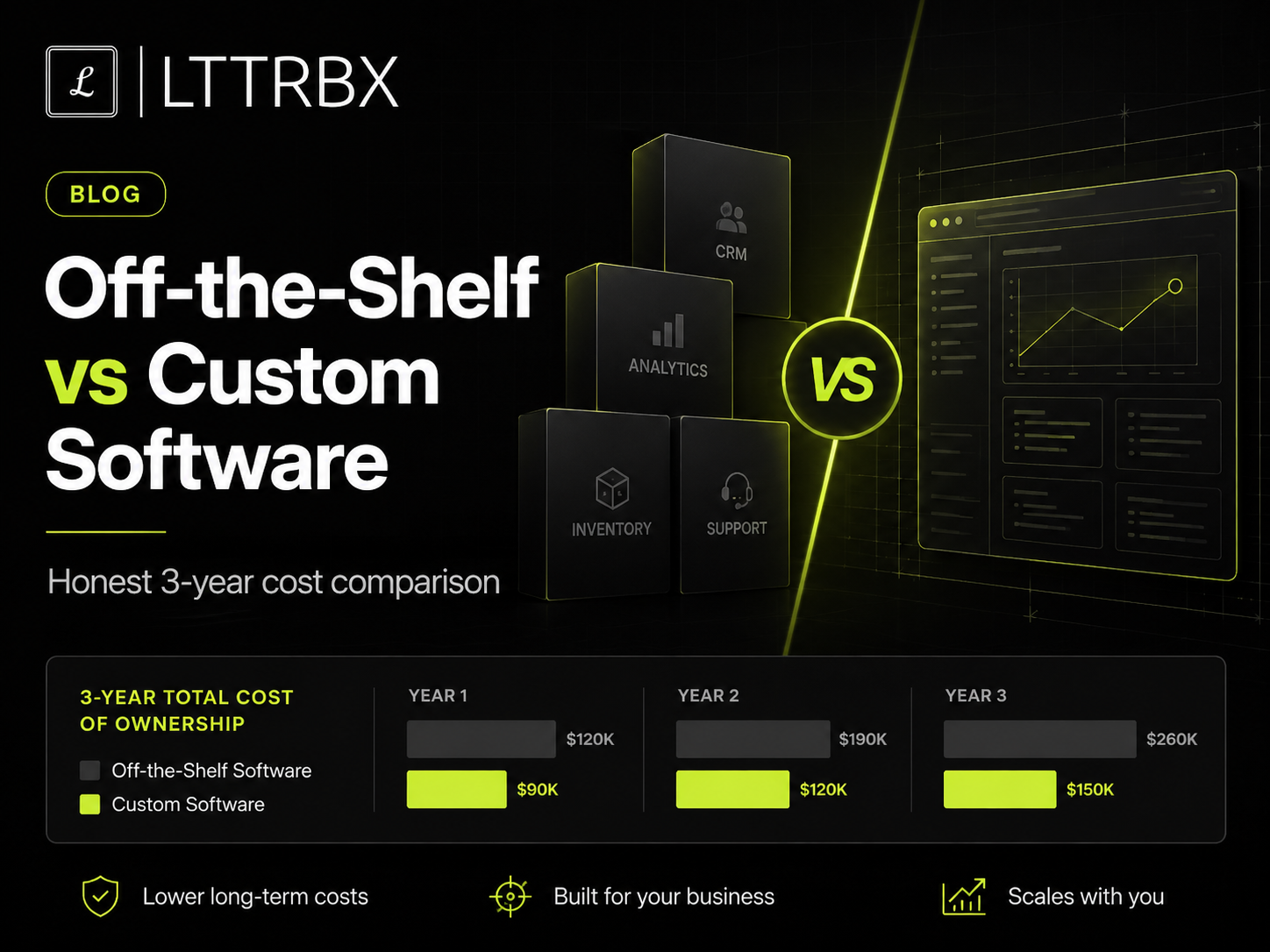
The short answer. Off-the-shelf software is cheaper to start but its costs compound — per-user fees, add-ons, integrations and the hidden cost of forcing your business to fit the tool. Custom software costs more upfront but you own it and it fits exactly. Over three years, the crossover often lands around the 18–36 month mark for businesses with real scale or unusual processes. The right answer depends on how well a ready-made tool actually fits.
“Why build custom when there's an app for that?” is a fair question — and for many businesses, off-the-shelf really is the right call. But the sticker price of a monthly subscription hides costs that only show up at scale, and founders often discover them a year in, when switching is painful. Let's compare honestly, over a realistic three-year window, so you can decide with eyes open.
The hidden costs of off-the-shelf at scale
- Per-user pricing that scales against you. A tool that's cheap for five users gets expensive for fifty. Your bill grows exactly as you succeed.
- Add-ons and tiers. The feature you need is always in the higher plan. The real price is rarely the advertised one.
- Integration costs. Making three or four separate tools talk to each other takes work — and breaks when any of them updates.
- The workaround tax. When the tool doesn't fit your process, your team invents manual workarounds. That lost time is a real, recurring cost nobody puts on the invoice.
- Lock-in. Your data and workflow live inside someone else's product. Leaving is expensive, so you keep paying.
A realistic 3-year comparison
The exact numbers vary, but the shape is consistent. Off-the-shelf starts low and rises with users and add-ons; custom starts high and then costs mainly maintenance. Somewhere in the middle, the lines cross.
Where the crossover happens
For a small business with standard needs, off-the-shelf usually stays cheaper indefinitely — and you should use it. The crossover appears when one of two things is true: you've grown enough that per-user fees and add-ons are a serious line item, or your process is unusual enough that no ready-made tool fits without painful workarounds. In those cases, a custom build often pays back within 18–36 months and keeps saving after.
A simple decision checklist
Does a ready-made tool fit 80%+ of your process without heavy workarounds? → Buy it.
- Are you stitching together three or more tools and still doing manual work between them? → Consider custom.
- Is your process a genuine competitive advantage you don't want to force into someone else's template? → Build it.
Are per-user fees growing faster than the value you get? → Run the 3-year math.
The bottom line
This isn't custom-vs-ready as a matter of pride — it's a math and fit question. Use off-the-shelf until it stops fitting or stops being cheaper; build custom when ownership and exact fit start paying for themselves. At LTTRBX we'll tell you honestly which side of that line you're on — including when the answer is “stick with the SaaS tool for now.”
Frequently asked questions
Is custom software cheaper than SaaS?
Not upfront — it costs more to build. But over three years, for businesses with real scale or unusual processes, it often becomes cheaper because you stop paying rising per-user fees and eliminate manual workarounds.
When should I choose custom software?
When a ready-made tool can't fit your process without heavy workarounds, when you're juggling several tools with manual work between them, or when your workflow is a competitive advantage worth owning.
What are the hidden costs of off-the-shelf software?
Rising per-user fees, higher-tier add-ons, integration work, the time lost to workarounds when the tool doesn't fit, and lock-in that makes leaving expensive.